 Business Central
 Sales
Sales Customer Engagement
 Customer Service
 Field Service
 Power BI
 Power Apps
 Power Pages
 Power Automate
 Microsoft Fabric
 Finance
 Supply Chain
 Project Operations
 More Microsoft expertise
Hire a Power Automate cloud-flow developer when business events need to trigger coordinated work across applications and services. A good resource defines the trigger, expected outcome, exceptions and support responsibilities before building. Evaluate reliability through duplicate events, missing data, delayed approvals and failed destination systems. The strongest proposal explains how the business will know whether work completed and what happens when it did not. Choose development capacity according to workflow complexity and the operational support your team already provides.
What to take from this guide
- Specify the business event and completed outcome for each workflow.
- Assess duplicate prevention, recovery and ownership as core development skills.
- Start with one complete process before expanding an automation backlog.
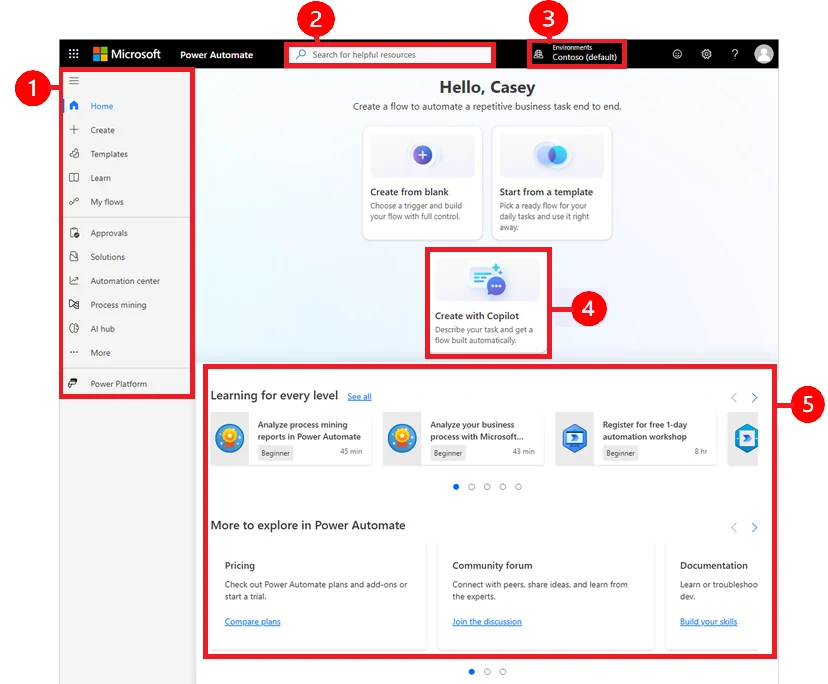
Begin with an event and a business outcome
An automation request often begins with a broad aim such as reducing email or speeding approvals. Turn that aim into a precise process statement. For example, when a valid purchase request is submitted, the correct manager reviews it and the requester receives a clear result. Then define valid, correct and result. These words conceal the business rules that determine the work.
Microsoft describes cloud flows as workflows connecting applications and services, with event-driven, manually initiated and scheduled types. For hiring, this means the resource must understand how work starts as well as what the individual actions do. Ask what happens if the event occurs twice, arrives late or contains incomplete information. A developer who can explain those cases is more useful than someone who only demonstrates how to connect two familiar products.
Separate workflow design from process ownership
A developer can implement approval rules, but someone in the business must decide them. Identify who approves a request, who substitutes during absence and whether a rejection ends the process or allows resubmission. Document whether approval thresholds depend on amount, department, supplier or another attribute. Avoid leaving these decisions inside an undocumented expression.
When reviewing Power Automate developer profiles, ask how they resolve conflicting requirements. For a hypothetical expense process, finance may want complete documentation before approval while managers prefer an early provisional decision. The resource should expose that disagreement and request an owner’s decision. Quietly choosing one interpretation creates a technical implementation of an unresolved policy. A short rule table reviewed by the business can prevent many later changes and makes testing more objective.
Assess reliability through difficult but realistic cases
Use a scenario with several steps: receive a request, validate it, obtain approval and create a destination record. Then interrupt it after the destination accepts the record but before the workflow records success. Ask how the developer would investigate and avoid creating a duplicate on retry. You do not need a particular implementation answer; you need clear reasoning about identity and state.
Other useful questions include what happens when a manager leaves, a required reference is deleted or an external service responds slowly. Ask how a support person distinguishes a temporary failure from invalid business data. The candidate should explain what can be retried automatically and what needs a human decision. Do not reward a promise that errors will never happen. Reliable automation makes errors visible, bounded and recoverable, with evidence of what has already taken place.
Agree an operational record rather than relying on success messages
A successful technical run is not always equivalent to a completed business process. A request may still be waiting for approval or may have been accepted by an interface but rejected later by the destination. Decide what status the business needs and who may correct it. Consider how an employee finds an outstanding item without reading technical run details.
A Power Automate support consultant may be useful where existing workflows are poorly understood or repeatedly fail. Begin with an inventory and a small set of critical processes. Explain which failures interrupt operations and which merely delay a convenience notification.
| Situation | Business evidence needed | Owner to name |
|---|---|---|
| Waiting for approval | Current approver and pending duration | Process owner |
| Invalid business data | Specific correction required | Requesting department |
| Destination unavailable | Last confirmed step and recovery state | Application support |
| Completed transaction | Destination identifier and final outcome | Business acceptance owner |
Need this expertise in your team?
Start with the workstream, expected outcome and working hours.
Review connections and policy dependencies early
Cloud workflows depend on access to the services they use. Microsoft data-policy guidance explains that connector restrictions can affect both authoring and existing execution. Include the platform administrator in design review before committing to an integration pattern. A workflow that works in an unrestricted development context may still conflict with the intended production rules.
The resource brief should list each source and destination, who owns it, and whether access approval is available. Ask how connections will remain supported when the original maker changes roles. Do not place credentials in task descriptions or shared examples. Have the responsible administrator approve the connection arrangement and document the recovery contact. Where external services are involved, identify who can investigate failures on the other side; a flow developer cannot resolve an unavailable application they do not control.
Test volume, timing and human delays
One successful request does not establish suitability for the full workload. Share normal and peak volumes, the busiest business periods and any deadlines. A process that runs comfortably during a demonstration may behave differently when many requests arrive together or when several depend on the same downstream system. Ask for a test plan tied to the expected pattern rather than an arbitrary sample size.
Human decisions introduce a separate set of timing issues. Agree reminders, escalation and what happens when approval is no longer relevant. A request may have changed or been withdrawn while waiting. Test those cases before release. For teams across Canada, the United States and Europe, define business calendars and time zones explicitly. A deadline described only as tomorrow can produce misunderstandings across locations. Capture the agreed interpretation in acceptance examples that both business reviewers and developers can understand.
Distinguish urgent transactions from work that can safely wait. A notification delay may be acceptable while a delayed release approval could stop operations. Ask the business owner to rank these consequences and use that ranking to shape monitoring and escalation. Do not apply the same alert to every failed action; excessive notifications can hide the items that need attention. A useful support design tells the responsible person what is affected, what has already happened and which decision is needed next.
Choose the right size of resource engagement
The Hourly Model works for troubleshooting a specific flow, reviewing a design or adding a bounded enhancement. Give the resource a clear investigation question and an expected output, such as a cause assessment with recommended actions. Do not measure a diagnostic task only by whether a quick fix was possible; discovering an architectural dependency may be the useful result.
Project Based hiring fits a defined workflow with stable rules and available system owners. Include exception handling, tests and operational handover in scope. Dedicated Resource hiring fits a continuing automation program with a prioritized backlog and a business owner who can make regular decisions. If process analysis remains the main uncertainty, consider a Power Automate automation consultant before increasing development capacity. More builders will not resolve conflicting business rules or missing access approvals.
Use a production-readiness checklist that business owners can review
Before launch, ask the resource to demonstrate the complete process and several failures with ordinary users. Have support follow the recovery instructions while the developer observes. Record any assumptions that remain, including destination availability and approval ownership. The handover should be specific enough that someone can distinguish a pending item from a failed one without guessing.
Review the first operating period with the process owner. Look at unresolved items, unnecessary notifications and corrections that users still perform manually. These observations can guide the next release more effectively than counting the number of automated actions.
- Name the trigger, final business outcome and authoritative transaction identifier.
- Approve the rules for rejection, resubmission, cancellation and absent approvers.
- Test duplicate input, missing data and interrupted processing.
- Confirm connections, policy approval and operational access.
- Assign monitoring, recovery and escalation ownership with agreed working hours.
- Document what support may retry and what requires business authorization.
Before your next hiring conversation.
Can a Power Automate developer automate our existing email approvals?+
Usually the first step is to clarify the approval rules and exceptions in those emails. Provide representative requests, decisions and escalation examples. The resource can then assess the workflow and dependencies. Avoid treating every variation in an email thread as a requirement; ask the process owner to define the consistent policy the automation should follow.
Should we hire a developer or an automation consultant first?+
Start with a consultant when the process, business rules or priorities are unclear. Start with a developer when those decisions are agreed and implementation is the main task. Some people cover both responsibilities, but verify that in the proposed profile. The engagement should identify who resolves process questions and who accepts the completed workflow.
What does a useful automation handover include?+
It includes a process description, dependency list, connection ownership, monitoring instructions and recovery examples. Ask for business statuses as well as technical details. Support should know how to identify completed work before retrying anything. Include the escalation contact for each connected system and the steps for safely changing an approval rule.
Your next step
To discuss Power Automate resources with Sirius Dynamics, share the event that starts the process, the desired final result and the systems involved. Include known exceptions, approximate volumes and the team that will operate the workflow. Request developer or consultant profiles, submit the process requirements or book a discovery discussion. A well-defined first automation gives both sides a practical basis for selecting the engagement model and responsibilities.
Check the product detail.
Official references for the product and delivery considerations discussed here. The hiring recommendations and illustrative scenarios are Sirius Dynamics editorial guidance.
- Overview of cloud flows ↗Supports cloud-flow purpose and trigger-type distinctions.
- Data policies ↗Supports the effect of connector policies on design and runtime; reliability recommendations are editorial guidance.